

Control Statements in java
Control Statements in java:
2. Continue statement: Continue statement is another type of control statements. The continue keyword causes the loop to immediately jump to the next iteration of the loop. Let’s understand this better with a flow chart:
Thank you
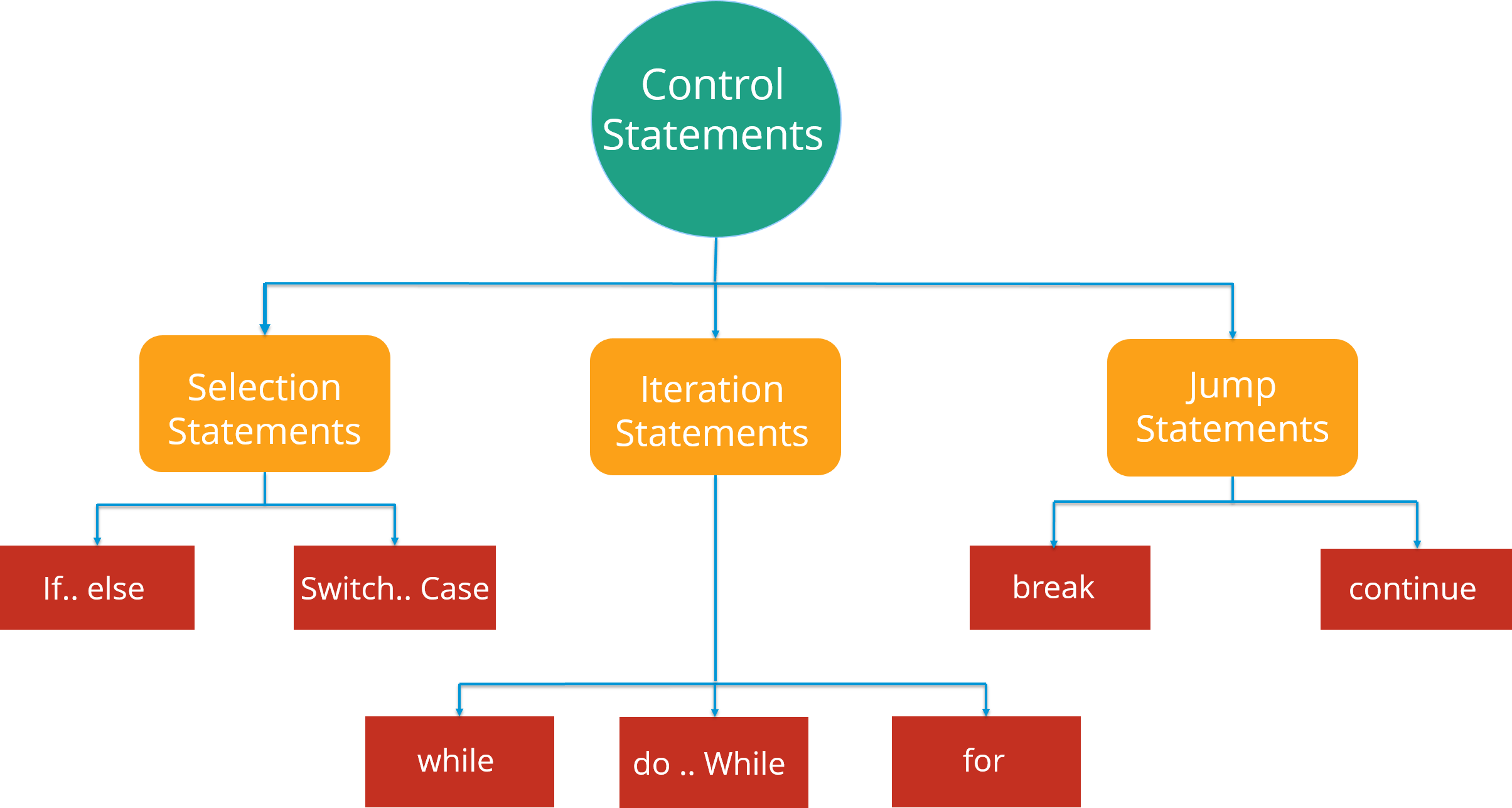
Control statements in java are the statements that define the flow of your program. There are 3 types of control statements in Java: Selection, iteration and jump statements.
 |
| Control statements in java |
Lets see these control statements one by one.
Selection Statements: Selection statements allow you to control the flow of the program during run time on the basis of the outcome of an expression or state of a variable. For example: you want to eat pizza, but then where can you get that pizza in best price. You can select between various popular options like Domino’s, Pizza Hut or any other outlet. So here you are following a selection process from the various options available.
Now these statements can be further classified into the following:
- If-else Statements
- Switch Statements
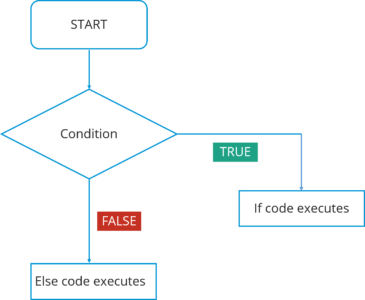
Refer to the following flowchart to get a better understanding of if-else statements:
 |
| selection statements |
In this flowchart, the code will respond in the following way:
- First of all, it will enter the loop where it checks the condition.
- If the condition is true, the set of statements in ‘if’ part will be executed.
- If the condition is false, the set of statements in the ‘else’ part will be executed.
Here you must have got an idea of how these if-else statements work. Now, how can we use these statements in Eclipse IDE? Let’s have a look at the code:
1
2
3
4
5
6
7
8
9
10
11
12
13
| public class Compare { int a=10, int b=5; if(a>b) { // if condition System.out.println(" A is greater than B"); }else { // else condition System.out.println(" B is greater"); }} |
In the above code, I have created a class Compare where I have compared two numbers ‘a’ and ‘b’. First of all, it will go in ‘if’ condition where it checks whether the value of ‘a’ is greater than ‘b’ or not. If the condition is true, it will print “A is greater than B” else it will execute “B is greater”.
Moving on, we have Switch case statement. The switch statement defines multiple paths for execution of a set of statements. It is a better alternative than using a large set of if-else statements as it is a multi-way branch statement.
Refer to the following flowchart to get a better understanding of switch statements:
 |
| Switch statements |
In this Switch case flowchart, the code will respond in the following steps:
- First of all it will enter the switch case which has an expression.
- Next it will go to Case 1 condition, checks the value passed to the condition. If it is true, Statement block will execute. After that, it will break from that switch case.
- In case it is false, then it will switch to the next case. If Case 2 condition is true, it will execute the statement and break from that case, else it will again jump to the next case.
- Now let’s say you have not specified any case or there is some wrong input from the user, then it will go to the default case where it will print your default statement.
Again, if we look at the code for switch statements in IDE, here it is:
1
2
3
4
5
6
7
8
9
10
11
12
13
14
15
16
17
18
19
20
21
22
23
24
| public class SwitchExample { int week=7; String weeknumber;switch(week){ // switch casecase 1: weeknumber="Monday"; break; case2: weeknumber="tuesday"; break;case3: weeknumber="wednesday"; break;default: // default case weeknumber="invalid week"; break; } System.out.println(weeknumber); } } |
In the above code, I have created a class SwitchExample which has 3 cases that print days of a week. It also has a default case which is executed whenever a user doesn’t specify a case.
Concluding both of the selection statements, we understood that if we are comparing two statements, we are using if-else, but let’s say if you are checking a specific value against a particular statement, then we are going for the Switch statement.
Next, there is another set of control statements, i.e Iteration Statements.
Iteration Statements: In Java, these statements are commonly called as loops, as they are used to iterate through small pieces of code. Iteration statements provide the following types of loop to handle looping requirements.
 |
| Iteration statements |
Let’s understand each one of them in detail:
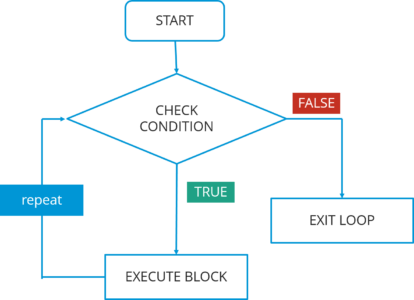
- While statement: Repeat a group of statements while a given condition is true. It tests the condition before executing the loop body. Let’s understand this better with a flow chart:
In this flowchart, the code will respond in the following steps:
 |
| while statements in java |
- First of all, it will enter the loop where it checks the condition.
- If it’s true, it will execute the set of code and repeat the process.
- If it’s False, it will directly exit the loop.
Now, let us see how you can implement the code in IDE.
1
2
3
4
5
6
7
8
9
10
11
12
| public class WhileExample { public static void main(String args[]) { int a=5; while(a<10) //while condition { System.out.println("value of a" +a); a++; System.out.println(""); } }} |
In the above code, it first checks the condition whether the value of a is less than 10 or not. Here, the value of a is 5 which in turn satisfy the condition, and thus perform functions.
- Do-while statement: It is like a while statement, but it tests the condition at the end of the loop body. Also, it will executes the program at least once. Let’s understand this better with a flow chart:
 |
| Do while statements |
In this do-while flowchart, the code will respond in the following steps:
- First of all, it will execute a set of statements that is mentioned in your ‘do’ block.
- After that, it will come to ‘while’ part where it checks the condition.
- If the condition is true, it will go back and execute the statements.
- If the condition is false, it will directly exit the loop.
Let’s see how you can implement the code in IDE.
1
2
3
4
5
6
7
8
9
10
| public class DoWhileExample { public static void main(string args[]){ int count=1;do { // do statement System.out.println("count is:"+count); count++; } while (count<10) // while condition } } |
In the above code, it will first execute the ‘do’ statements and then jump to the while part. In this program, the output would be : 1 2 3 4 5 6 7 8 9.
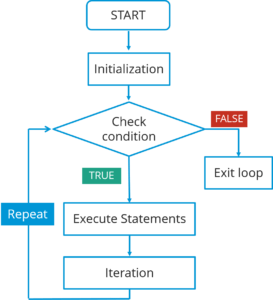
- For statement: For statement execute a sequence of statements multiple time where you can manage the loop variable. You basically have 3 operations here: initialization, condition and iteration. Let’s understand this better with a flow chart:
For statement in java
In this flowchart, the code will respond in the following steps:
- First of all, it will enter the loop where it checks the condition.
- Next, if the condition is true, the statements will be executed.
- If the condition is false, it directly exits the loop.
Let’s see how you can implement the code in IDE.
1
2
3
4
5
6
7
8
| public class ForExample { public static void main(String args[]) { for(int i=0; i<=10; i++) // for condition { System.out.println(i); } }} |
In the above code, it will directly print the numbers from 1 to 10.
The last type of control statement we will be discussing is Jump Statement.
Jump statement: Jump statement are used to transfer the control to another part of your program. These are further classified into – break and continue.
Let’s learn about them in detail:
- Break statement: Whenever a break statement is used, the loop is terminated and the program control is resumed to the next statement following the loop. Let’s understand this better with a flow chart:
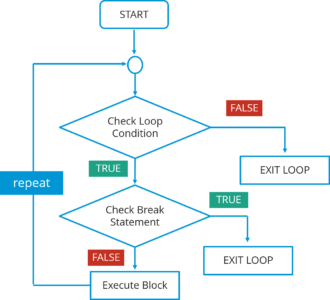
Break statement
In this flowchart, the code will respond in the following steps:1. First of all, it will enter the loop where it checks the condition.2. If the loop condition is false, it directly exits the loop.
3. If the condition is true, it will then check the break condition.
4. If break condition is true, it exists from the loop.
5. If the break condition is false, then it will execute the statements that are remaining in the loop and then repeat the same steps.
The syntax for this statement is just the ‘break’ keyword followed by a semicolon.
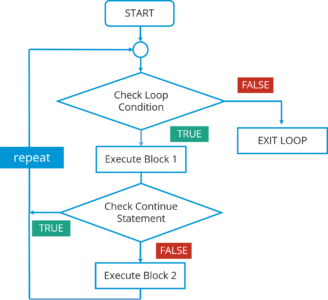 |
| Continue statement |
In this flowchart, the code will respond in the following steps:
- First of all, it will enter the loop where it checks the condition.
- If the loop condition is false, it directly exits the loop.
- If the loop condition is true, it will execute block 1 statements.
- After that it will check for ‘continue’ statement. If it is present, then the statements after that will not be executed in the same iteration of the loop.
- If ‘continue’ statement is not present, then all the statements after that will be executed.
The syntax is just the ‘continue’ keyword followed by a semicolon.Next, let us see what are classes and objects in Java.
Thank you


No comments
for more information plz do comment and follow my blog.